Sketch and Prototype Tools Review - Part 4 - Pencil
As a software designer and web developer I usually focus on the back end of web sites and applications and leave the User Interface and UX design to people more knowledgeable. Still, occasionally I have the need to do some sketching and drawing with a customer, for example when designing a web interface or when working on use case documents. While paper and pencil often work fine, they lack durability and the result is hard to share, especially with "digital" clients or clients in a different country. Over the years, I've been working with a number of software design tools to aid me in this process. Since I get asked which tools I use every now and then, I decided to write a short blog series outlining a number of these tools, including Balsamiq Mockups, Axure RP Pro, Microsoft Visio with the 'GUUUI Sketchy GUI Shapes', Pencil, and Microsoft's Sketchflow.
In this series I'll be (re)creating a design mockup for the Management section of my web site with each of the tools, giving you the opportunity to compare their output. You'll find a screen shot of the existing Management section at the end of this article.
Today's tool: Pencil 1.2.
Introduction
In my search for sketch and proto type tools, I recently ran into Pencil, currently at version 1.2 and available from the Pencil Project web site. Pencil is an open source GUI prototyping tool and is available for both Linux and Windows. Additionally, Pencil runs as a Firefox addon. For a sketching and prototyping tool running as an addon in Firefox doesn't make a whole lot of sense to me. I think that hosting it in Firefox makes it easier to distribute and update, and provides for more possible host environments and operating systems, but that's just my guess.
When you start Pencil (either the stand alone application or the Firefox addon), you get a design canvas and toolbox that looks familiar to other sketch applications, shown in Figure 1 (click image for a larger version):
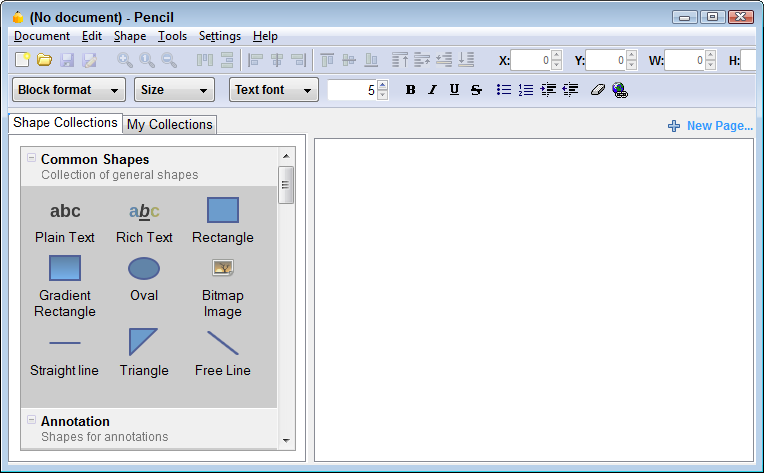
Figure 1 - The Main Screen of Pencil 1.2
What's confusing here is that this new window is not a new document yet. So, when you start dragging stuff from the toolbox, all you get is a "forbidden icon". You have to explicitly create a new document first using Document | New Document or Ctrl+N.
With the new document created, you can now start adding shapes to it. The toolbox on the left contains a number of categories of shapes, including common shapes, web specific, Windows XP specific and GTK specific. Some of them seem reasonable complete (the Windows XP category for example), while others are missing lots of shapes I could use often. For example, the Web category has just a few shapes, for headings, text, a bread crumb, a table and a few more. There are no complex Web widgets available out of the box, such as menus, tree views and so on. The Common category seems to be missing a few really common items such as plain white rectangles (the default rectangle has a blue fill and a blue border; cute, but not very usable in most designs), a "no image image" with a cross in the middle and a few more.
I think Pencil has been created by developers, for developers. Or at least: by developers. At times, it has functionality that would never pass any usability test in a commercial product. For example, storing user defined preferences is done directly in Firefox's About:config section. No way, Jose that I'll ever be able to explain my mom how to change the default number of undo levels in Pencil. I realize Pencil is under active development, so maybe one day somebody will build some UI on top of these nerdy settings.
At the same time, Pencil has some user friendly options, similar to what Balsamiq has. For example, the entire table with categories (except for the Edit buttons) can be created by dragging a table shape on the canvas and entering the following text:
ID | Description | Edit | []
3 | ASP.NET 1.x | | [*]
50 | ASP.NET 2.0 | | [*]
29 | CSS | | []
42 | JavaScript | | []
28 | T-SQL | | []
31 | Scripting | | []
34 | .NET Win Forms | | []
What that confusing "Use HTML Content" menu item on the context menu for the table does is completely beyond me, but inserting some rows and columns is pretty easy nonetheless.
Although I had to create some UI elements myself (such as the menu on the left that I built using h2 and h3 elements), it didn't take me very long to create the final mockup shown in Figure 3.
Once the design was done, I wanted to export it to some form of HTML or other type of document. It turned out that by default with a clean installation you can only export to .png. To export to other formats, you have to download and install one or more Export Templates. These templates in turn are used to generate HTML, script and images to display the mockups in browser. I tried a few, but unfortunately none of them really resulted in a satisfying presentation, so you'll probably want to export to plain .png files, or sit in front of your computer running Pencil when discussing the design with a client. Again, Pencil is under development so this may very well get better in the near future.
While looking for the Export Templates, I also ran into the Download Stencils page which enables you to download lots of other ready-made stencils, including a set for the Dojo UI widgets, lots of Famfamfam icons, flow chart shapes and more. Make sure you don't unzip the files after you've downloaded them as Pencil can use the ZIP file as-is (and as-is only). Also, make sure you import the shapes on the Shapes Collections tab using Install New Collection, and not on the My Collections tab of the toolbox.
After working with pencil for some time, I came up with the following lists of things I like and don't like:
Features I like
Here's a list of the features I find very useful in :
- The random text generator on the HTML Texts shape to quickly insert some lorem ipsum text.
- Some controls have useful actions I didn't expect to find, such as Make Squared on rectangle shapes.
- I like the idea of the Online Clipart tool that, by default, searches www.openclipart.org. Unfortunately, the feature appears to be broken as I can see my search resulted in some images, but I never get to see or select them.
- When creating a page you can set another page as its background. This is great for dialogs that lay on top of other screens (such as the confirmation message in Figure 3) because you only need to create the dialog, and not copy or recreate the underlying page.
- The Export Templates architecture looks interesting as it provides for a pluggable system where others can contribute export templates for easy reuse. Unfortunately, the ones that currently can be downloaded from the Pencil web site are far from ideal.
And here's some stuff that can be improved:
Things to Wish For
- Dragging at various zoom-levels could be improved. Right now, dragging and dropping works fine only at the default zoom level of 100%. Dragging and dropping an item on the canvas on a different zoom level may cause the item to completely disappear, or end up at an unexpected location (probably the location that mapped to the drop-location at a zoom level of 100%)
- A way to search the Shapes collection would be useful.
- Scroll zoom or mouse pointer zoom so you can zoom the area you want. Now it just zooms which means you spend quite some time looking for the location you want to work on.
- Custom Shapes are not always saved between sessions causing you to loose whatever you added to the Custom Shapes toolbox.
- The program suffers from some unclear and undocumented functionality. For example, what does "Hide heavy elements" do? When I choose it from the menu, nothing seems to happen. When I press its associated short cut key, some random shape is sent to the front and I manually need to send it back again. There's no documentation that describes what this feature does and how to use it. The same goes for the "Stencil Generator". It may be a cool feature but I have no idea how to use it or what to do with it.
- The Tab control could behave better. For some reason, it has a preference to preselect the Blogs item, and not the Admin item. Touching the text of the control temporarily fixes it, but as soon as you save or export to a PNG, Blogs is selected again.
- More and better default shapes, including more common web shapes such as trees, grids and menus.
- Linking is present and seems to work fine. However, because links are not maintained when exporting, it's hardly useful to link in the first place. Hopefully this is addressed with future updates or community Export Templates.
- At times, drag handles on shapes are completely unintuitive. Instead of consistent drag handles at the edges of a shape to change its dimensions, you often get rotate drag handles instead. The resize icon is then tucked away in a corner, trying to hide itself as much as possible.
- The Issues list on the Google code web site for pencil looks a little worrying. There are lots of open bug reports that, apparently, haven't been confirmed or fixed by the development team. I am not sure to what extent the development team is taking in active bug reports and suggestions, and I also don't know how that affects the quality and development of the software. All I see is a slightly worrying long list of issues.
The End Result
Which each of the tools I am reviewing, I am creating a mockup of the page in the Administration section of my web site that enables me to manage content categories. The page looks like this (click the image to get a bigger version):
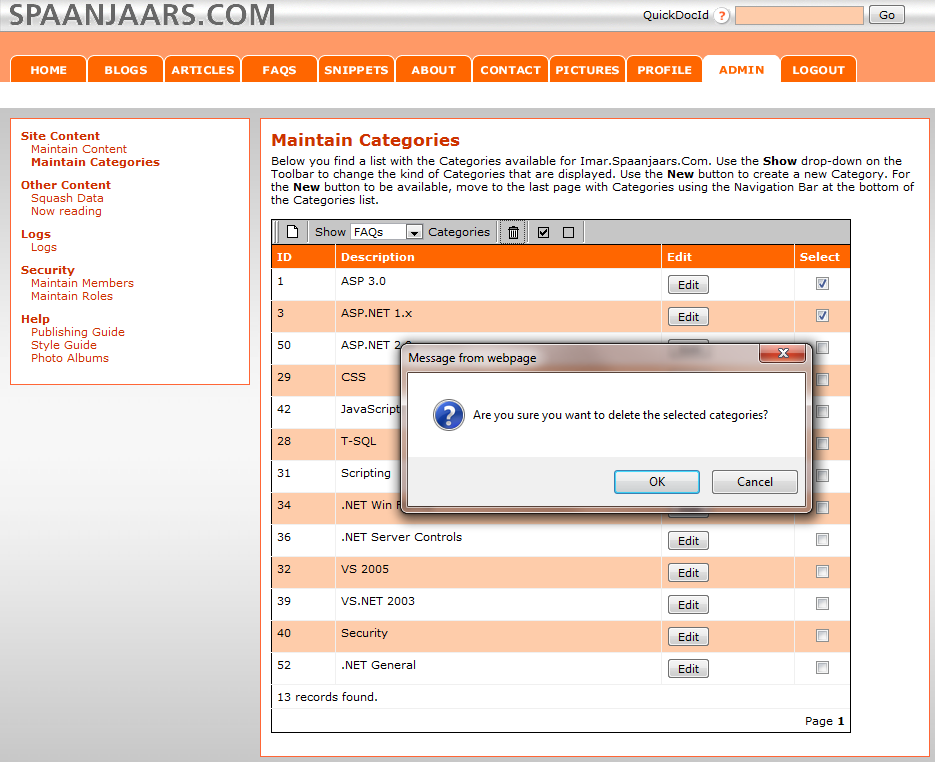
Figure 2 - The Management Section of Imar.Spaanjaars.Com
Using Pencil, I ended up with the following mockup (click the image to get a bigger version):
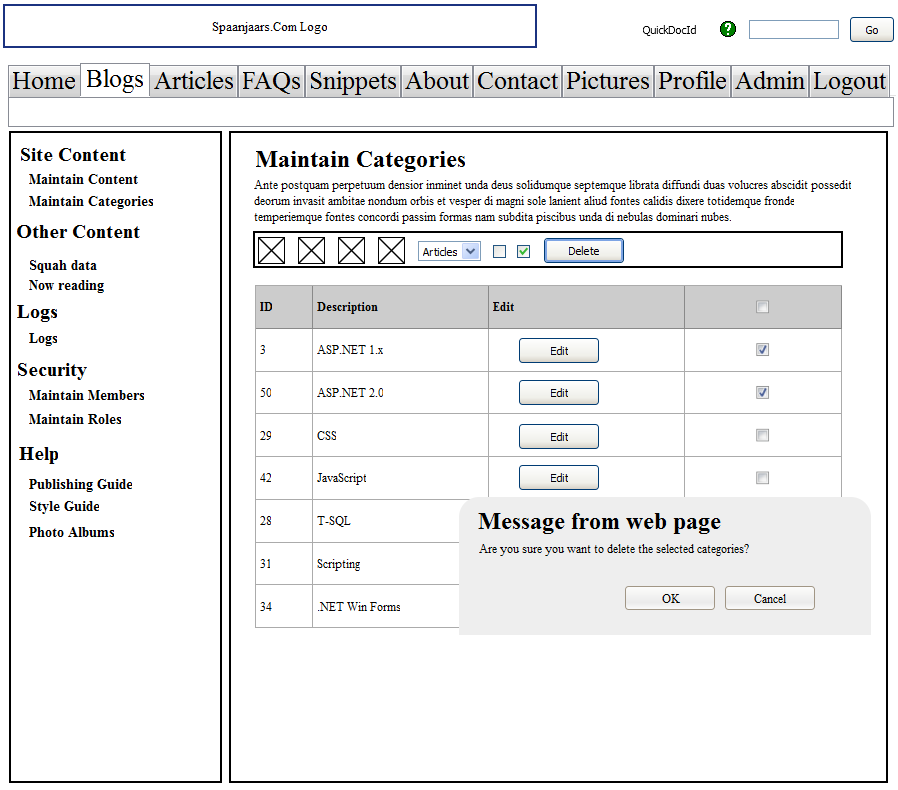
Figure 3 - The final result in Pencil
Summary
If you're looking for a low cost tool, or actually, if you're looking for a no-cost tool, Pencil is worth checking out as it has an excellent value for money ratio. However, it still feels rough on the edges and has a number of issues that make it difficult to work with at times. If you love open source or are looking for a free tool, go check it out. If, on the other hand, low costs works for you as well, be sure to check out Balsamiq.
Specs
| Price | Free |
| URL | http://pencil.evolus.vn/en-US/Home.aspx |
| Trial available | n/a |
| Application Mode | As a Desktop application on Windows and Linux, and as a Firefox addon. |
| Documentation |
Really limited, and still under construction. http://pencil.evolus.vn/en-US/UserGuides.aspx |
| Instruction videos |
Yes, but in ogg format which requires you to download and install suitable DirectShow filters first for Windows. http://pencil.evolus.vn/en-US/UserGuides.aspx |
Features |
|
| Linking | Yes, but I couldn't make linking work in any of the export features, making the feature a bit useless |
| Exporting | Yes, to PNG, HTML, Open Office, Microsoft Word and PDF, although the latter three require Export Templates that I couldn't find on the official Pencil web site. |
| Run-time viewer and annotation options | You can export as HTML, but not annotate afterward. |
| Web Browser Control | No |
| Phone Support | No, maybe through third party stencils but I haven't seen them. |
| Programmability (to change click behavior in presentation mode) | No |
| UI Types | Windows (XP), GTK and Generic |
Where to Next?
Wonder where to go next? You can post a comment on this article.
Links in this Document
| Doc ID | 539 |
| Full URL | https://imar.spaanjaars.com/539/sketch-and-prototype-tools-review-part-4-pencil |
| Short cut | https://imar.spaanjaars.com/539/ |
| Written by | Imar Spaanjaars |
| Date Posted | 06/08/2010 23:09 |
Comments
Talk Back! Comment on Imar.Spaanjaars.Com
I am interested in what you have to say about this article. Feel free to post any comments, remarks or questions you may have about this article. The Talk Back feature is not meant for technical questions that are not directly related to this article. So, a post like "Hey, can you tell me how I can upload files to a MySQL database in PHP?" is likely to be removed. Also spam and unrealistic job offers will be deleted immediately.
When you post a comment, you have to provide your name and the comment. Your e-mail address is optional and you only need to provide it if you want me to contact you. It will not be displayed along with your comment. I got sick and tired of the comment spam I was receiving, so I have protected this page with a simple calculation exercise. This means that if you want to leave a comment, you'll need to complete the calculation before you hit the Post Comment button.
If you want to object to a comment made by another visitor, be sure to contact me and I'll look into it ASAP. Don't forget to mention the page link, or the Doc ID of the document.