Sketch and Prototype Tools Review - Part 2 - Axure RP Pro 5.6
As a software designer and web developer I usually focus on the back end of web sites and applications and leave the User Interface and UX design to people more knowledgeable. Still, occasionally I have the need to do some sketching and drawing with a customer, for example when designing a web interface or when working on use case documents. While paper and pencil often work fine, they lack durability. Additionally, the result is hard to share, especially with "digital" clients or clients in a different country. Over the years, I've been working with a number of software design tools to aid me in this process. Since I get asked which tools I use every now and then, I decided to write a short blog series outlining a number of these tools, including Balsamiq Mockups, Axure RP Pro, Microsoft Visio with the 'GUUUI Sketchy GUI Shapes' stencil, Pencil, and Microsoft's Sketchflow.
In this series I'll be (re)creating a design mockup for the Management section of my web site with each of the tools, giving you the opportunity to compare their output. You'll find a screen shot of the existing Management section at the end of this article.
Today's tool: Axure RP 5.6.
Introduction
According to Axure, Axure RP is "the leading tool for rapidly creating wire frames, prototypes and specifications for applications and web sites." You can use it to create high fidelity designs for web sites and applications. Axure ships with a large set of features to help you in this process.
One of the major features of Axure is its programmability model. It's pretty easy and straightforward to program behavior behind buttons, text boxes, panels and other UI widgets as Axure calls them. By programming behavior, your design sketches or prototypes get a much more "final feel" helping you and your customers determine what's right or wrong, what works and what doesn't and enables you to test out many flows through the application without programming every single behavior for real in your development environment. Although "programming" may sound difficult (or scary if you're not a developer), you'll find that in Axure you can accomplish quite a lot even if you don't have a programming background.
Many of the widgets that ship with Axure have interactions attached to them. An image, for example, has OnClick, OnMouseEnter and OnMouseOut interaction (an event), a drop down list has OnClick, OnChange, OnFocus and OnLostFocus interactions, and so on. You can add cases to these interactions, and then associate a case with conditions that determine if, and under what conditions, the case fires its associated actions.
To see how this works, take a look at Figure 5 that shows the Delete button for the categories in the toolbar above the Grid. Clearly, it would make sense if the button checked if at least one category in the list was selected before it would fire the delete action. When that's the case, an alert box should pop up asking the user if she really wants to delete al the selected items. If no items are selected, a dialog should appear that instructs the user to select at least one category before before she can click the Delete button. To see how this behaves in the final prototype, you can try out a live demo here.This prototype supports the following behavior:
- Linking from the Admin tab to the Profile tab and back. I didn't implement the other tabs.
- Check if at least one item is checked in the Grid when the delete button on the Grid's toolbar is clicked. To try that out, uncheck all checkboxes and click the big red X on the toolbar. You'll see a dialog appear that tells you to check off at least one item. If you do that, and click the delete button again, you get a different dialog asking for confirmation.
- You can click Edit on the first Edit button (for ASP.NET 1.x). If you click Save, you're returned to the List page and a confirmation message appears (which disappears after a few seconds). When you click Cancel, you're just taken back to the List page.
To implement the Delete button in Axure, I carried out the following actions:
- I set up the toolbar as a rectangle with a bunch of images (I only assigned an actual image for the delete button) and other controls on top of it.
- I added a Dynamic panel to the prototype.
- Inside this panel (on a separate tab) I added the UI for the confirmation dialog.
- I hid the panel (right-click the dynamic panel and choose Edit Dynamic Panel | Set Hidden.).
-
Next, I added an Interaction for the OnClick event of the Delete button on the toolbar. I configured the interactions to look at the checkboxes in the grid and to show the Are You Sure dialog if at least one of them is checked. In all other cases, it should display the dialog with the instructions to select at least one item. After I set up the interactions, they ended up in the Annotations and Interactions panel as shown in Figure 1.
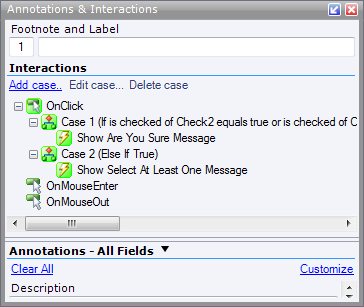
Figure 1 - The Annotations and Interactions Panel
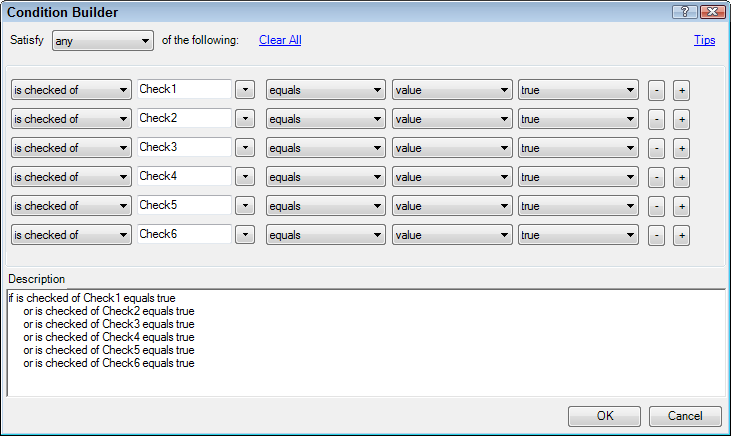
Each case can be configured using the Condition Builder that enables you to determine whether or not the actions for the case can be fired. In my case, I ended up with the following Condition Builder (click the image for a larger version)
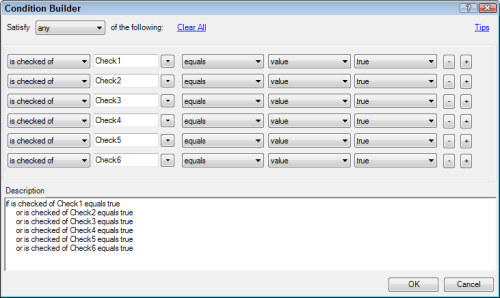
Figure 2 - The Condition Builder
Although a bit verbose, I think these expressions are pretty easy to create and understand, even for non-programmers.
-
In the If case (when at least one item is chosen as determined by the Condition shown in Figure 2) or the Else case (which is chosen by default if the If case doesn't evaluate to true) the correct dialog (placed inside a Dynamic Panel) is shown. This is easy to do with the Show Panel action as shown in Figure 3.
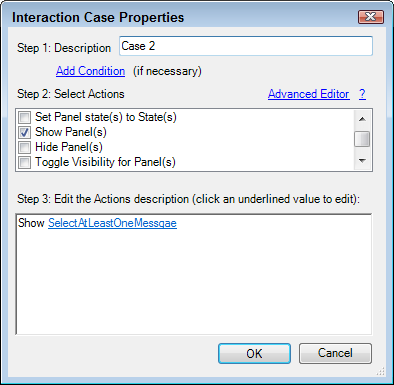
Figure 3 - Configuring Actions.
- A similar action is configured in the Else interaction (see Figure 1) which displays another Dynamic Panel when no checkbox has been checked.
With these actions and interactions, the final prototype behaves like a real web page, without the cost of programming the actual behavior. This helps to better communicate with your customer and potential end users and helps avoid problems later in the development cycle, where changes to behavior are much more expensive.
Another nice feature of Axure is the option to create a specification. Simply by hitting F6 you can generate a Microsoft Word document with a detailed break down of your site's pages, interactions, actions and so on. This will surely help communicate with your client and / or web developer about what is needed and how things are supposed to behave. The specification comes with screen shots of your prototype and details tables of actions and interactions. You can see an example of the specification document here.
Other Features I like
But Axure has more. Below you find a list of the features I like most in Axure RP:
- Good "Getting Started" walkthrough using a local Help File system introducing you to the most common concepts and actions. This walk through is accessible from the Welcome Screen which appears when you start Axure.
- The Annotations feature is pretty cool as well. A lot of items in Axure can be annotated with extra data - either predefined (like Description, Status and Target Release) or user defined. The annotations you enter are added to the Word specification document and to the final HTML prototype (to see an example, click on the yellow Comment icon for the Admin tab or the Delete button in the demo prototype). A cool feature with Annotations are the "Custom Views" that let you define named sets of data including your own choice of Annotation fields. This lets you focus on the annotation data you care about most, without getting distracted by irrelevant fields (which you can still access if you need them).
- Axure lets you create prototypes in two formats: HTML - to be viewed by a browser and .chm files (Compiled HTML) to be viewed on a desktop computer. The .chm option is a great way to share a prototype with a client without sending a gazillion separate files. It would have been even better if an Export to PDF (with linked pages) would have been available as well (see later).
- Axure has an option to create Shared Projects where multiple people can work on the same prototype. A simple Check In / Check Out process stops people from overwriting each others' changes. Complete with history and check in documentation, this feature makes it extremely easy to work on a prototype in a team.
Things to Wish For
Although Axure is pretty powerful and comes with a lot of useful features, I was also surprised by a number of big omissions or limited implementations of some features. Below is my wish list for a future release of Axure.
- The number of widgets that ships with Axure is surprisingly low, making it almost impossible to create good looking sketches without designing or creating each and every UI element yourself or without downloading external widgets. For example, the Tabs and the Buttons shown in Figure 5 don't ship with Axure out of the box. Fortunately, there's a strong community around Axure. Other users of Axure have created and submitted additional widgets. At the same time, Axure itself is supplying a number of additional widgets. IMO, many of the additional features should ship with the product in the first place. To find more widgets created by Axure, take a look here. You can find community widgets here. One of my favorites is the Better Defaults for Axure, a Widget Library by Loren Baxter. This widget library supplies, well, better defaults for the widgets that ship with Axure. Some other widgets can be found in the Downloads section of the Cone Trees web site. I find the Clear input field value on focus’ prototype/ widget library to be very useful (I used it for the Quick Doc ID box at the top of the page). Finally, the Yahoo! Design Stencil Kit is definitely worth checking out.
- Keyboard navigation could certainly be improved to make things more usable. Axure could benefit from the smart keyboard behavior Balsamiq - discussed in part 1 of this series - has. For example, when you add a new Menu, you get three items by default. It would be great if simply pressing Tab on the third item would create a fourth menu item next to it. Same goes for other common keyboard behavior. For example, why can't I delete an Interaction case by pressing Del. Why do I have to right-click and choose Delete Case instead?
- Another improvement that would be welcome is "Redo" or "Repeat" for actions you just carried out. For example, I create a new menu and then add a new menu item by right-clicking the menu and choosing Add Menu Item After. It would be handy if you could press Ctrl+Y to repeat the last action and add another menu item.
- The Tab bar (displaying the open documents) could be enhanced with a right-click menu with options such as Close, Close All, Close All But This etc. This is particularly useful after an action such as "Edit all states" which opens a lot of windows.
- There is no "Export to PDF" option which I really miss. Being able to export a complete prototype to a PDF with links maintained makes it easy to quickly send some drafts to a client. Clearly, a lot of functionality would be lost in the transition to PDF as it doesn't support all interactions available in Axure, but quite often that's not a problem. I know I can send .chm files with all interactions available, but these files come with problems of their own as Windows by default blocks certain functionality in them when they are downloaded from the Internet.
The End Result
Which each of the tools I am reviewing, I am creating a mockup of the page in the Administration section of my web site that enables me to manage content categories. The page looks like this (click the image to get a bigger version):
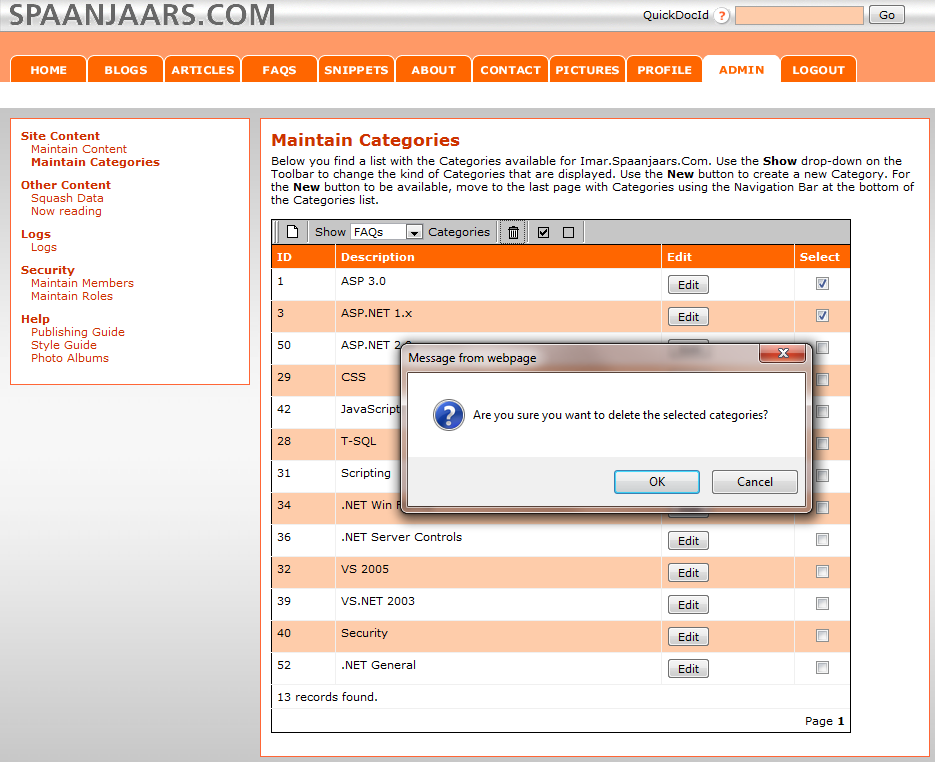
Figure 4 - The Management Section of Imar.Spaanjaars.Com
Using Axure, I ended up with the following mockup (click the image to get a bigger version):
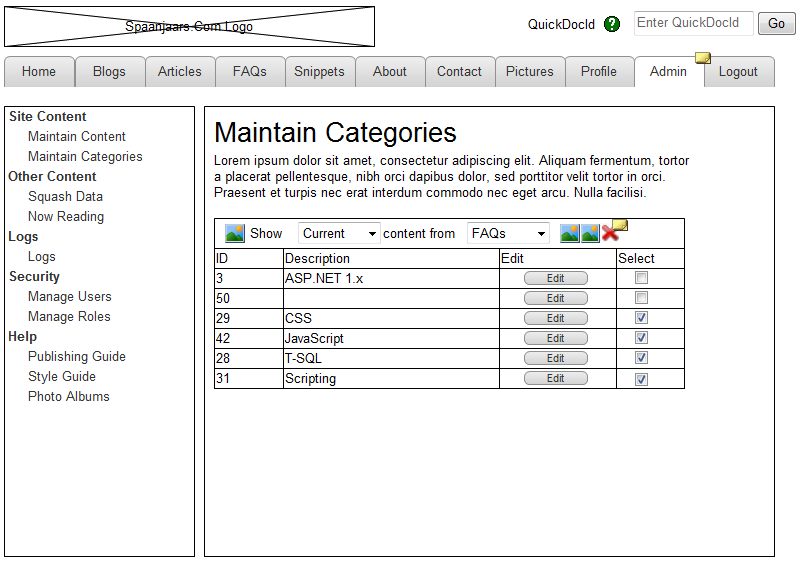
Figure 5 - The Final Result in Axure Mockups
In addition to a static screen shot, you can also try out a live version of the Prototype here. Notice I didn't implement a whole lot of functionality; only the Profile and Admin tabs are clickable and deleting and editing of categories "works".
Summary
Axure is a an excellent took to create high-fidelity, complex mockups that require a lot of interaction. Be prepared for a learning curve though, especially when implementing complex interactions with programmed behavior. Fortunately, the program and the accompanying web site have a large number of walkthroughs and other tutorials. Additionally, you can find a number of videos that show how to use Axure in the Videos section of their web site. If you need to create high-fidelity, complex and programmable prototypes, Axure RP Pro is definitely worth checking out.
Specs
| Price |
$589 - Perpetual Single User License (PC + Mac) $539 per license when you purchase 5 or more (Both come with 12 months of maintenance. Another year of maintenance updates costs $149.) |
| URL | http://www.axure.com/ |
| Trial available | Yes, feature complete; runs for 30 days. Available from: http://www.axure.com/downloads.aspx |
| Application Mode | Desktop, with a standalone installer. |
| Documentation | http://www.axure.com/online-training.aspx |
| Instruction videos | http://www.axure.com/online-training-videos.aspx |
Features |
|
| Linking | Yes, through simple linking or through programmability. Simple Linking uses the same interaction mechanism but enables you to link elements with just a few clicks. |
| Exporting | Yes, to HTML and to .chm files for stand alone viewing. Unfortunately, exporting to PDF is not available. |
| Run-time viewer and annotation options | No, both the HTML and the .chm version are read-only. |
| Web Browser Control widget | No |
| Phone Widgets Support | Through third party widgets |
| Programmability (to change click behavior in presentation mode) | Yes, fully programmable. |
| UI Types |
Out of the box: generic, not tied to a UI or OS. Third party: Widgets for OS X. |
Where to Next?
Wonder where to go next? You can post a comment on this article.
Links in this Document
| Doc ID | 532 |
| Full URL | https://imar.spaanjaars.com/532/sketch-and-prototype-tools-review-part-2-axure-rp-pro-56 |
| Short cut | https://imar.spaanjaars.com/532/ |
| Written by | Imar Spaanjaars |
| Date Posted | 05/25/2010 12:58 |
Comments
Talk Back! Comment on Imar.Spaanjaars.Com
I am interested in what you have to say about this article. Feel free to post any comments, remarks or questions you may have about this article. The Talk Back feature is not meant for technical questions that are not directly related to this article. So, a post like "Hey, can you tell me how I can upload files to a MySQL database in PHP?" is likely to be removed. Also spam and unrealistic job offers will be deleted immediately.
When you post a comment, you have to provide your name and the comment. Your e-mail address is optional and you only need to provide it if you want me to contact you. It will not be displayed along with your comment. I got sick and tired of the comment spam I was receiving, so I have protected this page with a simple calculation exercise. This means that if you want to leave a comment, you'll need to complete the calculation before you hit the Post Comment button.
If you want to object to a comment made by another visitor, be sure to contact me and I'll look into it ASAP. Don't forget to mention the page link, or the Doc ID of the document.