How to handle the error "The specified string is not in the form required for an e-mail address."
The Problem
When you run into this issue, you typically get an error such as this one:
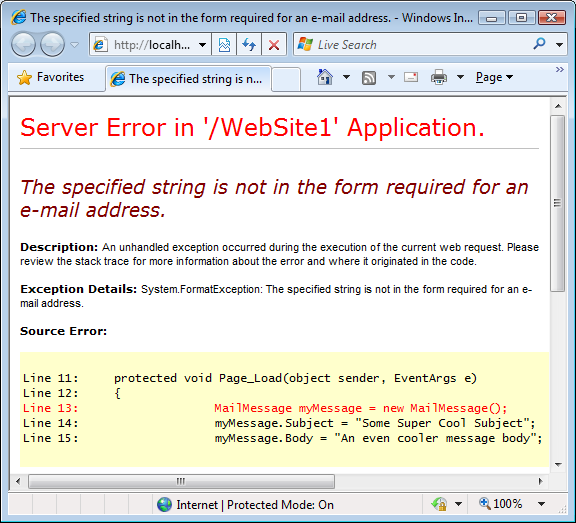
Figure 1
As you can see in Figure 1 the code crashes on the line with the constructor. At this point, you haven't even had the chance to assign an e-mail address; let alone an invalid one. So what's the deal here?
The problem in this case is not in the page itself, but rather in web.config. This configuration file has a <system.net /> element that enables you to store information about the mail server and the from account. If you make a mistake in the from attribute and enter an invalid e-mail address you get this error. For example, the following two examples will crash your page:
<system.net>
  <mailSettings>
    <smtp from="you.yourprovider.com">
      <network host="smtp.yourprovider.com"/>
    </smtp>
  </mailSettings>
</system.net>
Notice the missing @ symbol in the e-mail address. Also, incorrect encoded angled brackets may lead to the same error:
<system.net>
<mailSettings>
<smtp from="Your Name <you@yourprovider.com">
<network host="smtp.yourprovider.com"/>
</smtp>
</mailSettings>
</system.net>
This from attributes has an opening < character (encoded as <) but lacks the closing > bracket. To avoid the error, make sure the e-mail address in the from attribute has a valid syntax and uses the right angled brackets (if you use both a name and an e-mail address) like this:
<system.net>
<mailSettings>
<smtp from="Your Name <you@yourprovider.com>">
<network host="smtp.yourprovider.com"/>
</smtp>
</mailSettings>
</system.net>
In case you want to know why this code crashes when the class is constructed you can use Reflector and look in the class's constructor code:
public MailMessage()
{
  this.body = string.Empty;
  this.message = new Message();
  if (Logging.On)
  {
    Logging.Associate(Logging.Web, this, this.message);
  }
  string from = SmtpClient.MailConfiguration.Smtp.From;
  if ((from != null) && (from.Length > 0))
  {
    this.message.From = new MailAddress(from);
  }
}
Here you can see that the code uses the (internal and static) MailConfiguration property of the SmtpClient class that in turn provides access to the From name and address. This name and address value is then passed into the constructor of the MailAddress class which performs the actual validation using its private ParseValue method.
Where to Next?
Wonder where to go next? You can post a comment on this article.
Links in this Document
| Doc ID | 499 |
| Full URL | https://imar.spaanjaars.com/499/how-to-handle-the-error-the-specified-string-is-not-in-the-form-required-for-an-e-mail-address |
| Short cut | https://imar.spaanjaars.com/499/ |
| Written by | Imar Spaanjaars |
| Date Posted | 07/18/2009 15:45 |
Comments
Talk Back! Comment on Imar.Spaanjaars.Com
I am interested in what you have to say about this article. Feel free to post any comments, remarks or questions you may have about this article. The Talk Back feature is not meant for technical questions that are not directly related to this article. So, a post like "Hey, can you tell me how I can upload files to a MySQL database in PHP?" is likely to be removed. Also spam and unrealistic job offers will be deleted immediately.
When you post a comment, you have to provide your name and the comment. Your e-mail address is optional and you only need to provide it if you want me to contact you. It will not be displayed along with your comment. I got sick and tired of the comment spam I was receiving, so I have protected this page with a simple calculation exercise. This means that if you want to leave a comment, you'll need to complete the calculation before you hit the Post Comment button.
If you want to object to a comment made by another visitor, be sure to contact me and I'll look into it ASAP. Don't forget to mention the page link, or the Doc ID of the document.