Avoiding the "Works on My Machine" Syndrome
I was running the application locally, from within Visual Studio, but the database was still on our corporate network which I accessed through our VPN. The application was slow beyond imagination. I had to wait a few minutes for a simple page with a few pictures to completely load. At first I blamed the VPN, but other applications seemed to work fine. Then I blamed the database server in our network, but again, other applications running against the same development server seemed to work fine. A quick debug session revealed the real problem: we were not doing database paging, but application paging. So instead of telling SQL Server to do its magic and have it return 12 records to fill a "page" based on the search, filter and paging criteria, we got all records from the database that matched the search criteria and did filtering and paging inside the application. Depending on how you accessed the application and what pages you visited, that could literally mean we copied hundreds of thousands of records from the database to the application and then brought the list down to the 12 that needed to be displayed. That worked find on a fast LAN with only a few users. But it clearly revealed I had created a serious architectural problem once I tried to download those hundreds of thousands of records over a slow VPN connection. Once I identified that potential performance killer, the fix was easy: we moved the complete searching, filtering and paging mechanism to the database; in a bunch of stored procedures in our case. The database does what it needs to do, find the records the user is interested in, and only returns the "page" of records that needs to be displayed.
So what's the moral of this story? When you test applications, you need a good, representative data set and you need to try to mimic the final application circumstances as much as possible. In my case, I was lucky enough to have a representative set of over 250,000 pictures, but that's not always the case.
The other day I was working on the architecture of a reporting application that needs to show pivot tables and sums of sales over the past couple of years. To see how the application would behave, I wrote a couple of test reports to do the pivoting and grouping. However, entering enough test data by hand to create a representative set of data with possibly hundreds of thousands of records wasn't a very appealing thought. Then I rediscovered Red Gate's Data Generator; a tool I had used briefly in the past but had forgotten about since. With Data Generator, generating data is extremely simple. You point to a database, configure what data you want inserted and where and Data Generator does the rest for you. What I really like is the way the tool is able to recognize column names and then provide data that's appropriate for that column. The product ships with a large number of predefined generators for many of the "usual suspects" you come across in a database, such as first names, last names, address details, phone numbers, foreign key look ups, IDs, numbers and more. This makes it very simple to generate large amounts of test data that looks as real as possible.
To see how this works, consider my "Contact Manager Application" that I have written about extensively in my series on N-Layer Design. The application features a simple database model with a table for contacts and three related contact data tables for addresses, e-mail addresses and phone numbers, shown in Figure 1.
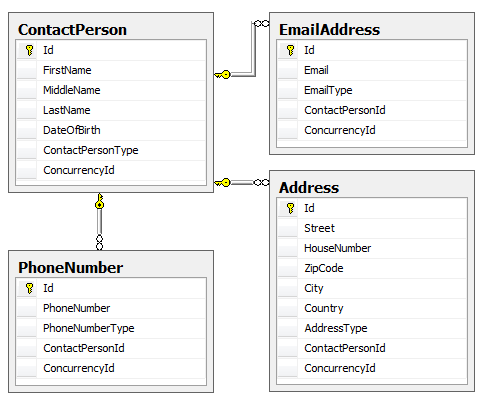
Figure 1
To generate data for this model, I came up with the following specifications:
- For the ContactPerson table, I want first, middle and last names that look like real names.
- For the date of birth I want to supply dates that resemble true birth dates of living people. In other words, I want dates that fall between today, and roughly 122 years back.
- For the contact tables I want data that looks real: real streets, states, countries, phone numbers, e-mail addresses and so on.
- The ContactPersonId of the three contact tables should point to a contact person in the ContactPerson table
- All four *Type columns should be constrained by their associated enum values from my model: 1,2 and 3 for ContactPerson (to indicate a Friend, a Family member or a Colleague) and 1 or 2 (for Personal or Business) for the Contact Details
- I want a representative mix of contact data for the contact people. E.g. some should have multiple phone numbers, others shouldn't have a home address and so on.
To accomplish these steps I configured Data Generator as follows:
- On start up of the tool, I selected my version of SQL Server and chose a database:
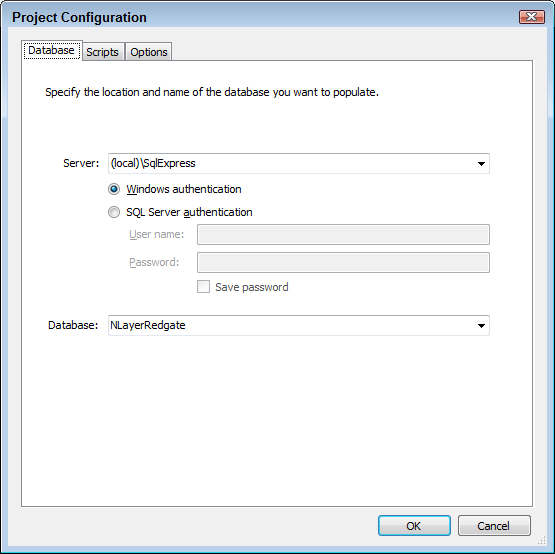
Figure 2
One feature request I have for this dialog is the option to choose local MDF files on disk using the AttachDbFilename option in the connection string. That would make it very easy to just point to a SQL Server database file without the need to attach it to SQL Server first.
- Once you click OK, the project is generated and you get an overview of all tables in your database.
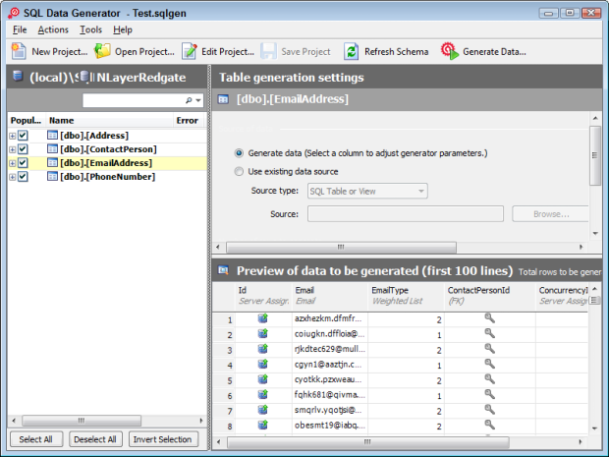
Figure 3
Here you can choose for which tables you want to generate data, and how that data should look. In my case, I selected all four tables.
- The next step is defining the data you want to insert in each column. For example, for the Street column of the Address table I chose Address Line (Street Number) as the generator, as shown in Figure 4:
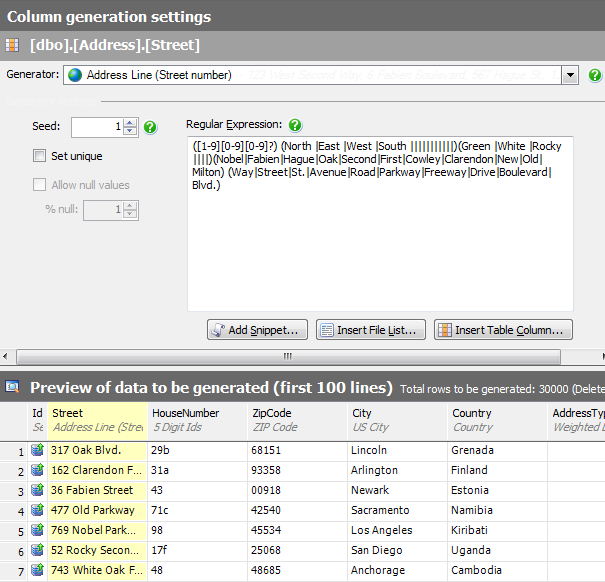
Figure 4
The Address Line (Street Number) generator is in fact a regular expression that generates random data based on some fixed values. You can easily modify the statement to generate other data, as I've done with the HouseNumber column:
This generates the house numbers in a typical Dutch format: numbers, optionally followed by one letter. I left ZipCode, City and Country to their defaults. This can lead to some funny results where Arlington ends up in Finland as can be seen in Figure 4. For my purposes, this is fine, but if you need more reliable data, you can alter the columns to load data from different sources, including other tables, text files or from one of the many predefined generators.[1-99]{2}|[1-99]{2}[a-f]{1}
- The AddressTypeId column in the Address table gets its value from a .NET enumeration in the application that looks like this:
public enum ContactType
{
  /// <summary>
  /// Indicates an unidentified value.
  /// </summary>
  None = 0,
  /// <summary>
  /// Indicates a business contact record.
  /// </summary>
  Business = 1,
  /// <summary>
  /// Indicates a personal contact record.
  /// </summary>
  Personal = 2
}
The 0 option shouldn't be valid in the database, so I want to insert either 1 or 2 as the contact type. With the Weighted List generator this is pretty easy. Just enter the value you want to insert and provide a relative weight.
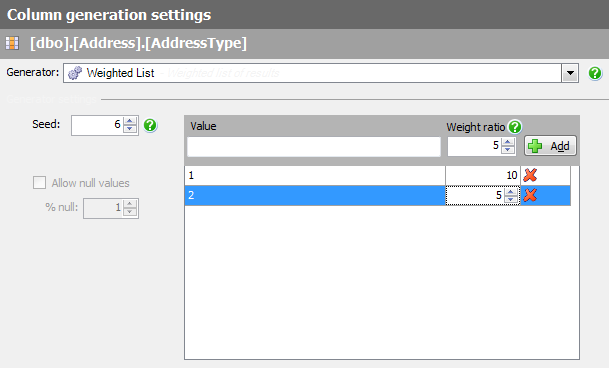
Figure 5
The cool thing about this option is that you can provide a relative weight to each unique value. In the settings shown in Figure 5, it means I'll end up with twice as many Business addresses as Personal addresses. - The final column of the Address table that's interesting to look at is the Foreign Key generator:
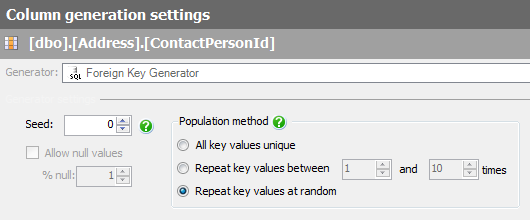
Figure 6
Basically this generator says: check out to which primary key column this foreign key column is associated and get the values from that column. In other words, each address that is generated is hooked up at random to one of the contact records in the ContactPerson table. Using the properties for the generator you can influence its behavior. The Seed property is used to influence the way the data is randomly generated, while the Allow null values enables you to generate an X amount of null values. In the case of the ContactPersonId this isn't possible as the relation doesn't allow nulls, but for many other columns this can be really useful.
- I followed similar steps to set up the other tables, each time choosing one of the appropriate generators and tweaking their settings to my liking.
- Once I had all columns set up correctly, I changed the number of test records to generate for each table. I created, for instance, 20,000 records in the ContactPerson table, only 10,000 e-mail addresses, but 30,000 phone numbers. The net result of that is that I end up with "real" data: I have some contacts that have multiple phone numbers, but also contacts without an e-mail address. This in turn helps you with testing your application as you can see what happens when people have zero, one or more contact records associated with them.
On the same dialog for each table you can also indicate if you want to delete all existing records first before you generate new ones. This is very useful during testing and development, but be cautious with this as it will clear out the entire table without further warnings. Don't experiment on a production system (that not only applies to the deletion of data, but to generating test data as well).
- With the project fully set up, I saved it and hit Generate Data. Only three seconds later, I had 75,000 test records in my database, ready to be tested in my application.
- I opened my Contact Manager Application in my browser and browsed a bit around in the contact data:
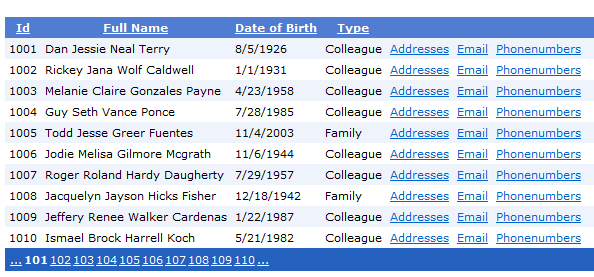
Figure 7
You can see from the large number of pager links at the bottom of the GridView that the database now contains lots of records. Additionally, you can see that the data represents what could be real people. Rickey Jana Wolf Caldwell used to be a colleague, but he recently retired.... ;-)
- Clicking the Addresses, Email or Phonenumbers links still shows the associated contact details for each contact person. Some have an e-mail address, others don't. Some have only one address, while others have a few of them.
Summary
I can see lots of situations or applications where generating test data like this is extremely useful. No more test pages with only one or two test records (often labeled asdf of qwrew), but real, representative data, and lots of it. This makes it easier to test your application, and find potential flaws in the design or architecture at design time, way before your application goes live and accumulates this amount of real data. Red Gate's Data Generator is definitely worth checking out if you're serious about generating test data for your application.
Now, all I need to find is that "Simulate Slow VPN Connection" check box in SQL Server's Options dialog, and I am good to go to do some real-world testing.
Where to Next?
Wonder where to go next? You can post a comment on this article.
Links in this Document
| Doc ID | 523 |
| Full URL | https://imar.spaanjaars.com/523/avoiding-the-works-on-my-machine-syndrome |
| Short cut | https://imar.spaanjaars.com/523/ |
| Written by | Imar Spaanjaars |
| Date Posted | 03/20/2010 15:40 |
Comments
Talk Back! Comment on Imar.Spaanjaars.Com
I am interested in what you have to say about this article. Feel free to post any comments, remarks or questions you may have about this article. The Talk Back feature is not meant for technical questions that are not directly related to this article. So, a post like "Hey, can you tell me how I can upload files to a MySQL database in PHP?" is likely to be removed. Also spam and unrealistic job offers will be deleted immediately.
When you post a comment, you have to provide your name and the comment. Your e-mail address is optional and you only need to provide it if you want me to contact you. It will not be displayed along with your comment. I got sick and tired of the comment spam I was receiving, so I have protected this page with a simple calculation exercise. This means that if you want to leave a comment, you'll need to complete the calculation before you hit the Post Comment button.
If you want to object to a comment made by another visitor, be sure to contact me and I'll look into it ASAP. Don't forget to mention the page link, or the Doc ID of the document.