Localizing client side JavaScript
As you may know, my Contact Manager application used in my new series on N-Layer design using ASP.NET 3.5 is fully localizable. That is, the site is available in two languages - English and Dutch - and users can choose the language they want to see the site in. The concepts behind the localization process are all built in to the ASP.NET framework and didn't require a lot of work from my side.
Shortly after I published the article on localization, I received an e-mail from a reader asking how he could use the same principles to translate client side JavaScript. He had written some custom JavaScript code that displayed messages to the user and he wanted an easy way to translate those messages as well. The good news is: it's pretty easy to do....
Localizing Client Script
Localizing client script is a three step process:
- Create a script file with the code you need translated and create copies for each supported language.
- Register the main copy of the script using a ScriptManager control.
- Register the supported languages using the ResourceUICultures property of the ScriptManager.
Once you've set up a page like this, you'll be able to work with the code in the localized version of the script which is served automatically based on the UICulture for the current page.
Creating the script files
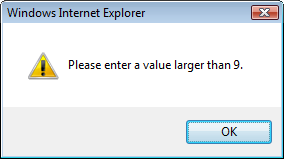
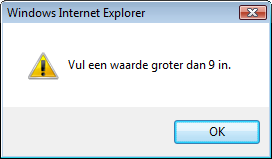
In the sample application (that you can download at the end of the article) I have an extremely simple page that allows a user to enter a number. If the number is less than or equal to 9, a message pops up that tells the user to enter a number greater than 9. The message can appear in two languages: English and Dutch.
To create localizable scripts, follow these steps:
- Create a folder like Scripts
- Add a .js file to it. I called mine StringResources.js but you can of course choose a different name. Add whatever code you need to this file.
- Create a copy of the file and suffix it with a culture like nl-NL for Dutch or fr-FR for French. In the sample application you find a file called StringResources.nl-NL.js to hold Dutch resources. You should create a copy for each language you want to support (other than the default language used in StringResources.js).
- Translate the code in the localized files. In my case, I simply changed:
var errorMessage = 'Please enter a value larger than {0}.';
var goodChoice = 'Excellent choice.';
var invalidEntry = 'This does not look like a valid number.';
to
var errorMessage = 'Vul een waarde groter dan {0} in.';
var goodChoice = 'Prima keuze.';
var invalidEntry = 'Dit ziet er niet uit als een geldig getal.';
Notice the {0} placeholders; I'll be using the ASP.NET AJAX framework function String.format to replace these placeholders with the minimum number I am expecting.
Setting up the ScriptManager
Inside a new ASPX page, drag a ScriptManager control to the page, directly under the opening <form> tag. Instead of doing this over and over again in all your pages, you can also use a Master Page and add the ScriptManager to that file so it becomes available on all pages using that Master Page.
Next, set the EnableScriptLocalization property of the ScriptManager to true and then hook up your client side JavaScript file using the ScriptManager's <Scripts> element. You should end up with a definition for the ScriptManager like this:
<asp:ScriptManager ID="ScriptManager1" runat="server" EnableScriptLocalization="true">
  <Scripts>
    <asp:ScriptReference Path="~/Scripts/StringResources.js" />
  </Scripts>
</asp:ScriptManager>
If you'd try out the code now, you will find that it won't work. For a script file to become available in different languages, you also need to register the languages you want to support.
Registering supported languages
This is actually a really simple step: all you need to do is assign the languages (or cultures) you want to support as a comma separate list to the ResourceUICultures property of the ScriptReference element. In my case, US English is my default, so all I need to register is the Dutch language:
<asp:ScriptManager ID="ScriptManager1" runat="server" EnableScriptLocalization="true">
  <Scripts>
    <asp:ScriptReference Path="~/Scripts/StringResources.js" ResourceUICultures="nl-NL" />
  </Scripts>
</asp:ScriptManager>
When you now run the application, .NET will look in the same folder as the initially referenced script for files suffixed with the active culture, provided it has been added to the ResourceUICultures property. If the file exists, it replaces the original file. If the currently active culture is not registered in the ScriptReference, the ScriptManager will happily serve the file you initially registered. This way, you'll always have a fallback language that is used for unsupported cultures. If you register a culture that has no corresponding file, the ScriptManager will link to the non-existing file anyway, resulting in errors in the browser.
Using the localized resources
With all the setup done, the actual code is now really easy. In the sample page, I use the ASP.NET AJAX pageLoad method to find my two controls (a button and a text box) and setup a handler for the button's click event. When you enter a value and click the button, this code gets executed:
function btnDo_Click()
{
  var enteredNumber = Number.parseLocale(txtNumber.value);
  if (isNaN(enteredNumber))
  {
    alert(invalidEntry);
  }
  else
  {
    if (enteredNumber <= minSize)
    {
      alert(String.format(errorMessage, minSize));
    }
    else
    {
      alert(goodChoice);
    }
  }
}
To use the resource, I simply refer to the variables setup in the script file, like invalidEntry and errorMessage. Notice how ASP.NET AJAX gives you a handy String.format method, just as you're used to in .NET.
If you look in the source for the page when it's using English, you'll find this script reference:
<script src="Scripts/StringResources.js" type="text/javascript"></script>
If you switch to Dutch, the script reference will now point to the localized version:
<script src="Scripts/StringResources.nl-NL.js" type="text/javascript"></script>
Note that you're not limited to using string resources. Since the file contains just JavaScript, you can add whatever you want to the file, enabling you to change logic based on the currently active culture.
Download Files
Source Code for this ArticleWhere to Next?
Wonder where to go next? You can post a comment on this article.
Links in this Document
| Doc ID | 489 |
| Full URL | https://imar.spaanjaars.com/489/localizing-client-side-javascript |
| Short cut | https://imar.spaanjaars.com/489/ |
| Written by | Imar Spaanjaars |
| Date Posted | 02/24/2009 10:34 |
Comments
Talk Back! Comment on Imar.Spaanjaars.Com
I am interested in what you have to say about this article. Feel free to post any comments, remarks or questions you may have about this article. The Talk Back feature is not meant for technical questions that are not directly related to this article. So, a post like "Hey, can you tell me how I can upload files to a MySQL database in PHP?" is likely to be removed. Also spam and unrealistic job offers will be deleted immediately.
When you post a comment, you have to provide your name and the comment. Your e-mail address is optional and you only need to provide it if you want me to contact you. It will not be displayed along with your comment. I got sick and tired of the comment spam I was receiving, so I have protected this page with a simple calculation exercise. This means that if you want to leave a comment, you'll need to complete the calculation before you hit the Post Comment button.
If you want to object to a comment made by another visitor, be sure to contact me and I'll look into it ASAP. Don't forget to mention the page link, or the Doc ID of the document.