How Do I Display a List With Control IDs in a Control's Property?
To implement this behavior, you'll need to create your own TypeConverter class. Andy Smith already has done all the hard work by creating a class called ServerControlConverter that derives from StringConverter. You can check out his blog about this class to see how it works. The class has a method called IncludeControl that can be overriden by a class deriving from ServerControlConverter to limit the list of control IDs returned to those of a specific type.
Let's assume your Web Control Library project in Visual Studio .NET contains two controls: ControlA and ControlB. ControlB has a property called ControlToValidate (although you can choose another name that makes more sense) which accepts the ID of another control as a string. To make it easier for your control users to bind a control to this property in a visual designer like Visual Studio .NET or the Web Matrix, the property grid for ControlB should display a drop-down with the IDs of all controls of type ControlA that are available on the current page: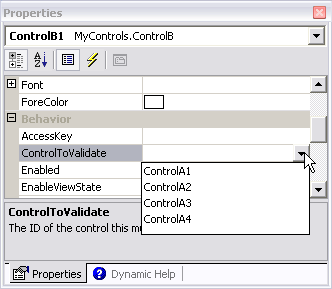
Figure 1: The Properies Dialog for the Control
Let's look at how you can accomplish this:
- In the Web Control Library project with your two server controls (ControlA and ControlB in this example), add a new class file and call it ServerControlConverter.cs. Copy and paste the code for the ServerControlConverter class from Andy's web blog to that file.
- Add a second class file and call it ControlAConverter.cs. The ControlAConverter class will inherit from the ServerControlConverter and override the IncludeControl method, so it only returns true when the control is of type ControlA. Add the following code to the class file:
using System;
using System.Web.UI;
namespace MyControls
{
  public class ControlAConverter: ServerControlConverter
  {
    protected override Boolean IncludeControl(Control serverControl)
    {
      if (serverControl is ControlA)
      {
        return true;
      }
      else
      {
        return false;
      }
    }
  }
}
Make sure that the original ServerControlConverter and ControlAConverter class are both in the same namespace, or change the code to match your namespace conventions. - The next step is to hook up the property of your ControlB control to this type converter. You can do that by adding a TypeConverterAttribute attribute to the property definition. The TypeConverterAttribute is usually abbreviated to just TypeConverter.
In the ControlB class, right above the property definition, add the following code:string controlToValidate = ""; [ TypeConverter(typeof(ControlAConverter)) ] public string ControlToValidate { get { return controlToValidate; } set { controlToValidate = value; } } - Finally, save all your pages, and compile the control. In your ASP page, add your controls to the toolbox and drag a couple of instances of ControlA on an .ASPX page. Next, drag an instance of ControlB on the page. Make sure the instance of ControlB is selected on the designer surface, and then select the ControlToValidate property in the property grid. Instead of a regular text field, you'll see a drop-down that lists the IDs of all controls of type ControlA, just like the screen shot earlier in this article.
That's all there is to it. From this point on, the private field controlToValidate can contain the ID of another control. To access that control at run-time, use code similar to this:
if (controlToValidate.Length > 0)
{
  if (this.Page.FindControl(controlToValidate) != null)
  {
    ControlA myControlA = (ControlA)this.Page.FindControl(controlToValidate);
    // Do whatever you need to do with the instance of myControlA, like
    // accessing its properties:
    string testString = myControlA.AStringProperty;
  }
}
If you don't want the end users of your control to manually add the ID of a control, but limit them to those presented in the list instead, you'll need to override the method GetStandardValuesExclusive. That method in the base class ServerControlConverter returns false by default, allowing items to be entered directly in the property grid. Add the following code to your ControlAConverter class to disallow manual items:
public override bool GetStandardValuesExclusive(ITypeDescriptorContext context)
{
  return true;
}
Download Files
Source Code for this ArticleWhere to Next?
Wonder where to go next? You can post a comment on this article.
Links in this Document
| Doc ID | 305 |
| Full URL | https://imar.spaanjaars.com/305/how-do-i-display-a-list-with-control-ids-in-a-controls-property |
| Short cut | https://imar.spaanjaars.com/305/ |
| Written by | Imar Spaanjaars |
| Date Posted | 06/21/2004 19:12 |
| Date Last Updated | 06/29/2004 09:21 |
| Date Last Reviewed | 06/10/2006 15:32 |
| Listened to when writing | Spieluhr by Rammstein (Track 7 from the album: Mutter) |
Comments
Talk Back! Comment on Imar.Spaanjaars.Com
I am interested in what you have to say about this article. Feel free to post any comments, remarks or questions you may have about this article. The Talk Back feature is not meant for technical questions that are not directly related to this article. So, a post like "Hey, can you tell me how I can upload files to a MySQL database in PHP?" is likely to be removed. Also spam and unrealistic job offers will be deleted immediately.
When you post a comment, you have to provide your name and the comment. Your e-mail address is optional and you only need to provide it if you want me to contact you. It will not be displayed along with your comment. I got sick and tired of the comment spam I was receiving, so I have protected this page with a simple calculation exercise. This means that if you want to leave a comment, you'll need to complete the calculation before you hit the Post Comment button.
If you want to object to a comment made by another visitor, be sure to contact me and I'll look into it ASAP. Don't forget to mention the page link, or the Doc ID of the document.