How Do I Allow My Web Application to Write to Files, Folders and Databases?
Before you can change the security settings, it's important to find out the account that IIS is using. It's this account that needs the permissions to write to disk or to the database. Check out the FAQ: How Do I Determine the Account that IIS Uses? to find out what that account is. In the rest of this FAQ, I'll assume the user account is IUSR_MachineName (where MachineName is the name of your computer), but it might just as well be another account in your situation
I split up this FAQ in two sections: File Based Security Settings and SQL Server Security settings. The first section describes the steps you need to perform to adjust the security settings for file based operations, like writing to text files and to a Microsoft Access database. The second part shows you how to add a user to SQL Server and grant it the required privileges.
File Based Security Settings
If you need to grant access to specific files on your disk, it's often easier to grant those rights of the parent folder than to individual files. This way, you can manage a bunch of files together, without changing the security settings for each file separately. If you are changing the settings for a Microsoft Access database (an .mdb file), you have to grant the rights to the folder because at run-time, temporary lock-files are written to the folder where the database is out.
You can change the settings on the Security tab of the Properties dialog for the folder or file you want to change. If you don't see the Security tab, check out the FAQ: Why Don't I See a Security Tab on the Properties dialog for My Files and Folders in Windows XP?
To change the security settings, perform the following 5 steps:
- Locate the folder where your database resides in. It's often a good idea to store the database in a special folder outside the Web scope like C:\Databases. This way, you can make sure that at run-time the database can be accessed, while the users of your Web site cannot download the database by typing in an address like http://www.YourSite.Com/Databases/YourDatabase.mdb. This way your database is safe from prying eyes. The rest of this FAQ assumes you have stored your database in C:\Databases. If you decide to store the database within the scope of your Web site, you'll have to take extra precautions to prevent the database from being downloaded.
- Right click the folder Databases, choose Properties and switch to the Security tab. You'll see a screen similar to this:
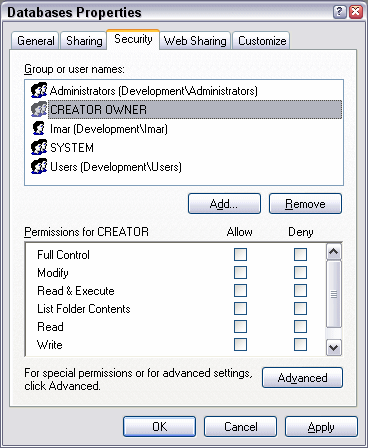
Figure 1 - The Properties Dialog for the Databases Folder
On this screen, you'll see various accounts and groups listed that have access to this folder. For example, you'll see that, among other accounts, both the group Administrators and the account Imar are listed. It's good practice to limit access to your Databases folder as much as possible by removing permissions you don't really need. Evaluate each name in the group or user names list, and determine whether they need access or not. Usually, I remove all user names, except for my own name, the Administrators group, the Creator Owner account and the System account. Before you start removing all permissions, it's a good idea to read a bit in the Windows Help system about the implications of changing the security settings. - Once you're done removing the user accounts you don't need, click the Add... button, and then type of the name of the user account you discovered earlier in this FAQ. For the sake of this article, I'll assume the account is IUSR_MachineName but if you're using ASP.NET or set up IIS to use a different account, your account name may be different. Type IUSR_MachineName in the text box at the bottom of the Select Users or Groups dialog. Don't forget to replace MachineName with the name of your computer:
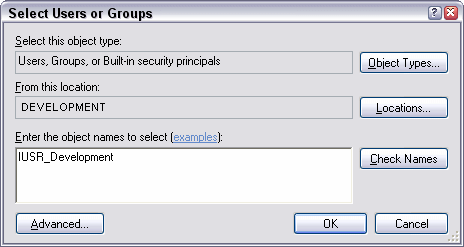
Figure 2 - The Select Users or Groups Dialog - Once you click the OK button, the IUSR account will be listed in the Group or user names box as Internet Guest Account (MachineName\IUSR_MachineName). Click the account, and then make sure that the account has at least Read and Write permissions:
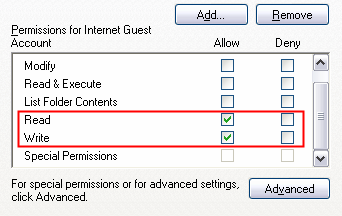
Figure 3 - The IUSR account needs at least Read and Write permissions
Depending on the requirements for your application, you may need to give other permissions as well. - Once you're done setting the individual security permissions for the Internet Guest Account, click the OK button to apply the changes to the folder and close the dialog.
From this point, you Web application is allowed to write to files located in the folder C:\Databases, including any Microsoft Access database you may have in that folder.
SQL Server Security settings
Because SQL Server is not directly file based, but server based, you'll need to change the security settings in SQL Server, rather than at the NTFS / disk level. To grant your user account access to your database, follow these steps:
- Open the SQL Server Enterprise Manager from the Windows Start Menu .
- Expand your server in the tree on the left until you see Security.
- Open the Security node, right-click it and choose New Login...
- In the Name field, type the name of the user account you discovered earlier in this FAQ in the format MachineName\AccountName or DomainName\AccountName.
- At the bottom of the dialog, choose the database you wish to grant this user access to from the Database list.
- Next, click the Database Access tab, and locate your database again. Check the Permit column for your database in the upper list, and then fine-tune the access rights by selecting the appropriate roles below. Usually, the roles public, db_datareader and db_datawriter will be enough, but for your application the requirements may be different. Finally, click OK to add the user account to SQL Server.
- If you want, you can further fine-tune the access rights for this user account. To do that, open the node Databases in the Enterprise Manager, expand your database and then choose Users. The account you created in the previous steps will be listed here. Right-click it, choose Properties and click the Permissions button. On the screen that follows, you have very detailed control over the security settings for all the objects in your database, like Tables, Views and Stored Procedures.
From this point on, your Web application should be able to successfully connect to your SQL Server database.
Where to Next?
Wonder where to go next? You can post a comment on this article.
Links in this Document
| Doc ID | 290 |
| Full URL | https://imar.spaanjaars.com/290/how-do-i-allow-my-web-application-to-write-to-files-folders-and-databases |
| Short cut | https://imar.spaanjaars.com/290/ |
| Written by | Imar Spaanjaars |
| Date Posted | 05/09/2004 18:52 |
| Date Last Updated | 08/06/2006 13:38 |
| Date Last Reviewed | 08/06/2006 13:38 |
| Listened to when writing | Me and my monkey by Robbie Williams (Track 10 from the album: Escapology) |
Comments
Talk Back! Comment on Imar.Spaanjaars.Com
I am interested in what you have to say about this article. Feel free to post any comments, remarks or questions you may have about this article. The Talk Back feature is not meant for technical questions that are not directly related to this article. So, a post like "Hey, can you tell me how I can upload files to a MySQL database in PHP?" is likely to be removed. Also spam and unrealistic job offers will be deleted immediately.
When you post a comment, you have to provide your name and the comment. Your e-mail address is optional and you only need to provide it if you want me to contact you. It will not be displayed along with your comment. I got sick and tired of the comment spam I was receiving, so I have protected this page with a simple calculation exercise. This means that if you want to leave a comment, you'll need to complete the calculation before you hit the Post Comment button.
If you want to object to a comment made by another visitor, be sure to contact me and I'll look into it ASAP. Don't forget to mention the page link, or the Doc ID of the document.