How Do I Enable Visual Styles in My .NET Win Forms Application?
With the .NET Framework 1.1, however, things have become much easier.
At the bottom of this FAQ you'll find a link to an article that explains how to enable Visual Styles for the .NET Framework 1.0. It explains how to create a manifest file.
For version 1.1 of the .NET Framework, things are much easier. Instead of creating the manifest file, all you need to do is call Application.EnableVisualStyles() from within the Main method of your application.
If your application already contains a Main method, simply add the call to EnableVisualStyles() somewhere to that method. If you don't have a Main method yet, add the following code your application:
' VB.NET
<System.STAThread()> Public Shared Sub Main()
  Application.EnableVisualStyles()
  Application.Run(New Form1)
End Sub


// C#
[STAThread]
static void Main()
{
  Application.EnableVisualStyles();
  Application.Run(new Form1());
}
Don't forget to change Form1 in the code above with the name of your StartUp form.
For controls that support the FlatStyle property, you have to set that property to FlatStyle.System. Other controls, like the ProgressBar, the TabControl and the TextBox will automatically apply the new Windows XP look. The following screen shot shows a Windows Form application with Visual Styles enabled. Notice the looks of the second button: even though Visual Styles are enabled, because the FlatStyle property of the button is set FlatStyle.Standard instead of FlatStyle.System, the button does not take on the new look: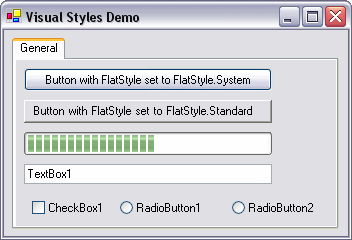
Figure 1 - The Sample Application with Visual Styles Enabled
If you don't make the call to EnableVisualStyles() at all, or view the application on an older Windows version, like Windows 2000, this is what you'll see instead: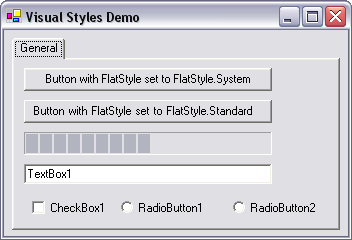
Figure 2 - The Sample Application without Visual Styles Enabled
References
Related Articles
Where to Next?
Wonder where to go next? You can post a comment on this article.
Links in this Document
| Doc ID | 269 |
| Full URL | https://imar.spaanjaars.com/269/how-do-i-enable-visual-styles-in-my-net-win-forms-application |
| Short cut | https://imar.spaanjaars.com/269/ |
| Written by | Imar Spaanjaars |
| Date Posted | 04/13/2004 12:39 |
| Date Last Updated | 11/02/2020 16:31 |
| Date Last Reviewed | 12/07/2006 17:24 |
| Listened to when writing | <strong>king o' cats</strong> by <strong>360's</strong> (Track 5 from the album: <strong>supernatural</strong>) |
Comments
Talk Back! Comment on Imar.Spaanjaars.Com
I am interested in what you have to say about this article. Feel free to post any comments, remarks or questions you may have about this article. The Talk Back feature is not meant for technical questions that are not directly related to this article. So, a post like "Hey, can you tell me how I can upload files to a MySQL database in PHP?" is likely to be removed. Also spam and unrealistic job offers will be deleted immediately.
When you post a comment, you have to provide your name and the comment. Your e-mail address is optional and you only need to provide it if you want me to contact you. It will not be displayed along with your comment. I got sick and tired of the comment spam I was receiving, so I have protected this page with a simple calculation exercise. This means that if you want to leave a comment, you'll need to complete the calculation before you hit the Post Comment button.
If you want to object to a comment made by another visitor, be sure to contact me and I'll look into it ASAP. Don't forget to mention the page link, or the Doc ID of the document.